
LEAVE MANAGEMENT

WorkSpace: A Leave Management System Built for Software Teams

WorkSpace tracks casual, earned and sick leave under your own policy, shows who is away, and keeps the rest of the team's day in the same place: Google Meet standups on a shared calendar, and Git branches, pull requests and issues inside work tickets.

At a Glance
  • CL, EL and SL balances under your policy
  • Indian public holiday calendars
  • Standups and Git work in one place
Outcome 01
No more leave spreadsheets
Outcome 02
See who is away before you plan
Outcome 03
Self-hosting available
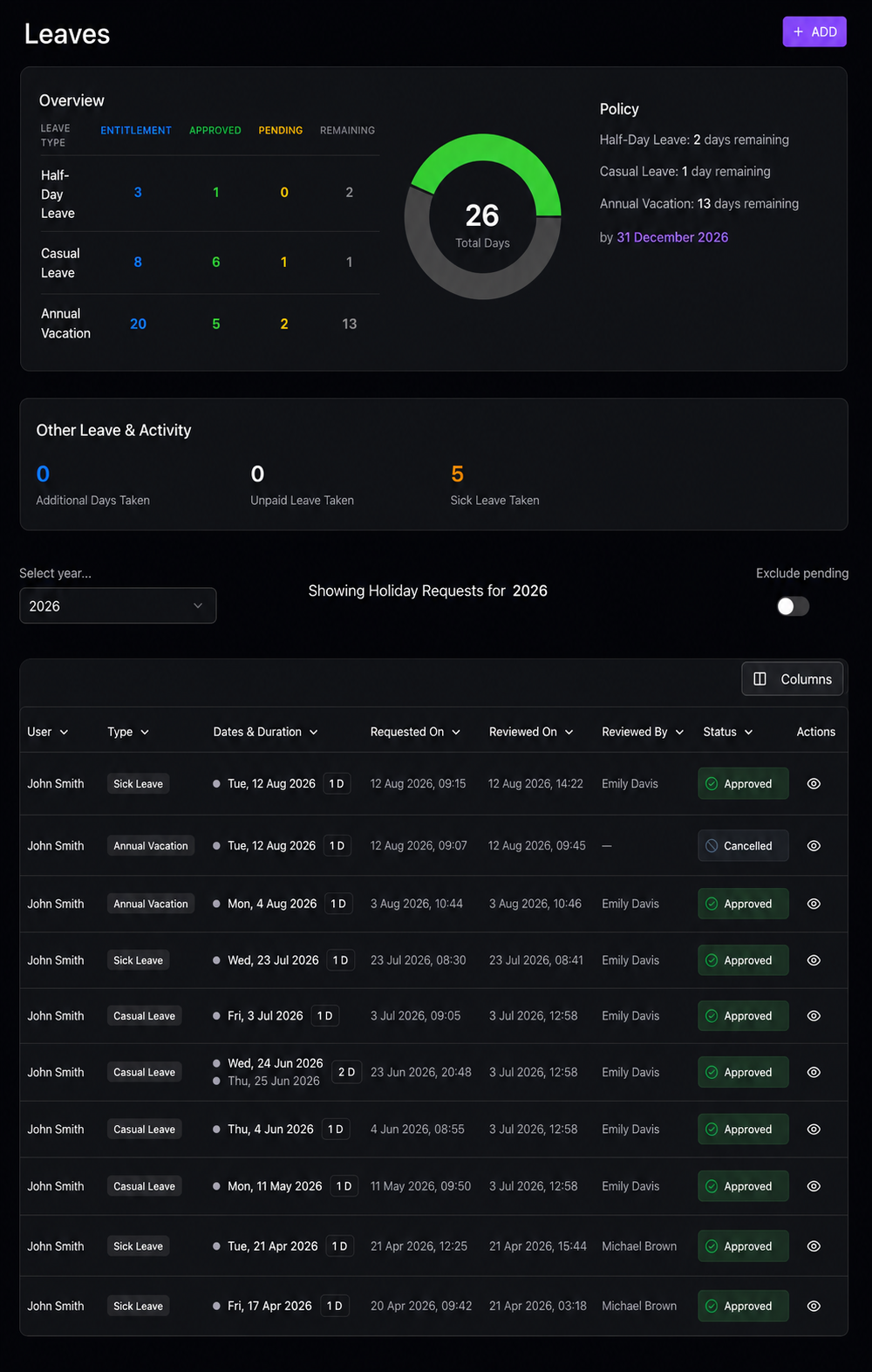
WorkSpace leave dashboard with casual, half-day and annual leave balances

WHY WE BUILT IT

Why We Built WorkSpace

We built WorkSpace for our own engineering team. Leave lived in a spreadsheet, standups lived in a calendar, and the actual work lived in GitHub and GitLab. Every week someone asked who was in today, a leave balance didn't match what payroll expected, or a standup ran without anyone knowing which pull requests were stuck.

A full HRMS felt too heavy for a software team that mainly needed three things: accurate leave balances, a shared view of who is available, and a clear picture of the work in progress. WorkSpace puts those three in one place. We now offer it to other teams in India that have the same problem.

WorkSpace is a good fit if:

  • your team tracks leave in spreadsheets, emails or chat messages
  • managers find out someone is on leave only when a deadline slips
  • your engineers switch between the ticket, the Git host and the calendar all day
  • you want your team's data on your own infrastructure

LEAVE MANAGEMENT

Leave Management That Follows Indian Leave Rules

Most leave disputes are not about the law. They are about a balance nobody can explain. WorkSpace keeps every balance traceable.

  • Leave requests and approvals in a few clicks. Employees apply, managers approve, and the balance updates straight away.
  • Casual leave (CL), earned leave (EL) and sick leave (SL) tracked automatically, with your own policy rules for entitlements and approvals.
  • Proration of balances, so people who join mid-year get the right entitlement.
  • Public holiday calendars for the regions and countries your team works in, including India.
  • A team availability view and heatmap, so managers see who is away before planning a sprint or a release.

Leave rules in India come from your state's Shops and Establishments Act and your own policy, so WorkSpace lets you set the rules rather than hard-coding one state's numbers. For how earned leave, casual leave and encashment work, read our guide to leave encashment rules in India.

STANDUPS AND GIT

Standups, Calendar and Git Work in the Same Place

Leave is only useful when it sits next to the work. WorkSpace brings the rest of the team's day into the same tool.

Shared calendar with Google Meet sync

  • Schedule standups and meetings on a shared calendar that syncs with Google Calendar and Google Meet.
  • Recurring meetings, agendas and task cards live on the calendar, so a standup starts with the right context.

Git work inside tickets

  • Search your GitHub or GitLab repositories and create a feature branch from the ticket.
  • Open pull requests (or GitLab merge requests), request reviewers and confirm merges without switching tabs.
  • Search, assign and close issues linked to the pull request you are working on.

Activity from real commits

  • Webhooks bring in push events and pull request changes as they happen, and past commits can be synced on demand.
  • Contribution graphs and activity timelines show progress from the actual work, not from status updates.

Non-technical colleagues in operations, HR, design or marketing use the same tool for tasks, meeting agendas and leave.

GETTING STARTED

How a Team Gets Started With WorkSpace

Phase 01

Set Up Your Workspace

Create your organisation and project boards, invite your team, and give each person a role (super admin, admin, lead or developer), so everyone sees only what they need.

Phase 02

Set Your Leave Policy

Choose the public holiday calendars for your locations, set CL, EL and SL entitlements and approval rules, and connect Telegram for leave and team notifications.

Phase 03

Connect Git and Calendar

Link your GitHub or GitLab repositories and connect Google Calendar and Google Meet, so tickets, pull requests and standups stay in sync.

Phase 04

Run the Team From One Place

People apply for leave, run standups and move work forward from their tickets, while leads see availability and progress on one screen.

SELF-HOSTING

Host It Yourself

Leave records and work activity are your employees' personal data. WorkSpace can run on your own infrastructure, so that data stays where you decide, and you control who can reach it. That also makes it easier to answer the questions India's data protection law asks of employers; our DPDP Act compliance checklist explains what those are.

Enquire and we will walk you through the hosting options and what your team needs to run it.

FREQUENTLY ASKED QUESTIONS

Questions About WorkSpace

Straight answers about leave management, Git, calendars and hosting.

What is a leave management system?
It is software where employees apply for leave, managers approve it, and balances update automatically, instead of spreadsheets and emails. WorkSpace does this for casual, earned and sick leave under your own policy, with public holiday calendars and a team availability view.
Does WorkSpace follow Indian leave rules?
Yes. It tracks casual leave (CL), earned leave (EL) and sick leave (SL), prorates balances for people who join mid-year, and includes India's public holiday calendar. Because entitlements differ by state and by company, you set the policy rules yourself.
Is WorkSpace a full HRMS?
No. WorkSpace focuses on leave, availability, meetings and the team's work in Git. It does not run payroll, so it sits alongside whichever payroll provider you already use.
Can developers create branches and pull requests from WorkSpace?
Yes. From a ticket, developers can search GitHub or GitLab repositories, create a branch, open a pull request or merge request, request reviewers and manage linked issues without leaving WorkSpace.
Does it work with Google Calendar and Google Meet?
Yes. Meetings and standups sync with Google Calendar and Google Meet, so the team's calendar and WorkSpace show the same schedule.
Can we host WorkSpace on our own servers?
Yes. WorkSpace can run on your own infrastructure. Enquire and we will explain the options.
How do we see a demo?
Use the enquiry form and tell us how your team handles leave and work today. We will arrange a walkthrough focused on your setup.

See WorkSpace in action

Tell us how your team tracks leave and work today, and we will show you how WorkSpace fits.

Enquire About a Demo